Guide
Ebook cover size for KDP and the other stores
Every store has its own cover rules: the size, the file type, and what the cover may say. The paperback adds a back cover and a spine sized from the page count.
Amazon KDP
- JPEG or TIFF, RGB, under 50 MB.
- Ideally 1600 x 2560 px; at least 625 x 1000 px, at most 10000 px on a side; the height at least 1.6 times the width.
- No "free" and no promotion on the cover.
- The title on the cover must match the title in the book’s details.
The other stores
- Apple Books: the shortest side at least 1400 px, RGB, JPEG or PNG; the front cover only, matching the metadata, no 3D mock-up.
- Google Play Books: between 640 and 7200 px.
- Kobo Writing Life: JPG or PNG up to 5 MB, portrait, the width about three quarters of the height.
- Barnes & Noble Press: at least 1400 px on each side is recommended.
Text on the cover
A cover is generated during the pipeline. With an image provider configured (kie.ai, fal.ai or the free fallback) it is an AI illustration; without one you get a clean typographic cover. Either way EbookForge overlays the title and author itself.
The paperback wrap
Build the paperback wrap cover
In the Print (paperback) panel, choose White paper or Cream paper and press Build paperback cover. EbookForge draws one sheet, back cover, spine and front cover, from the current cover and the book's blurb, sizes the spine from the page count of the interior PDF (building it first if needed) and the paper, adds 0.125 in of bleed on every side and leaves a white barcode box on the back. The trim is 6 x 9 in. The panel shows the spine, trim and full wrap sizes once built; it needs a cover to exist and, like every export, waits until generation has finished.
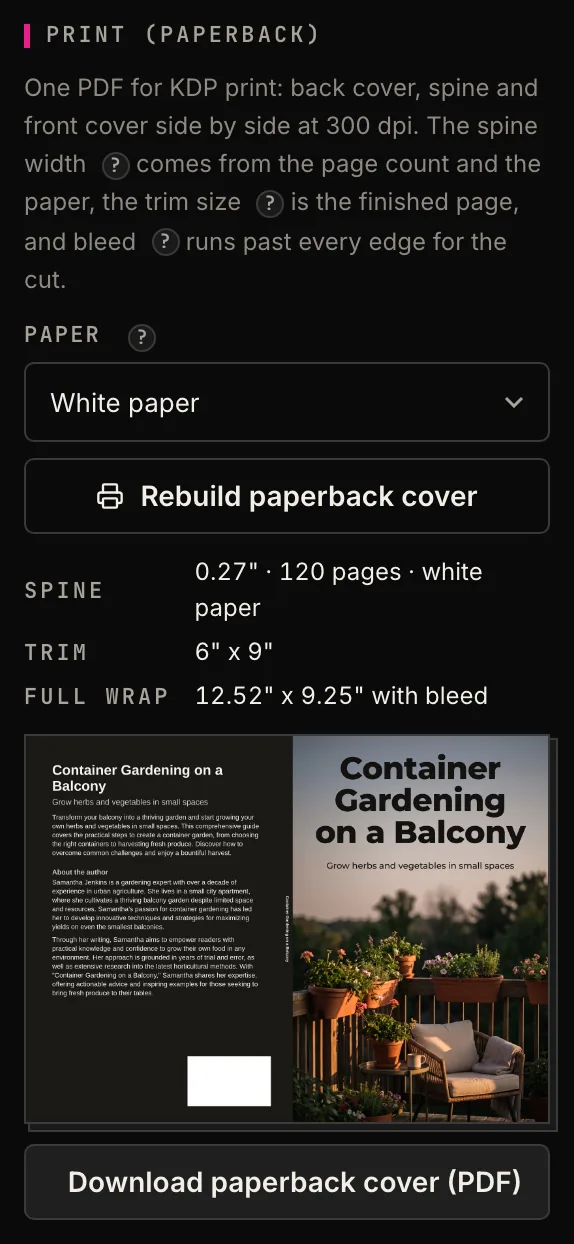
Spine text appears only from 79 pages, as KDP requires. Under that, the panel says "too thin for spine text" and the spine is left plain.
Check the preview, download the 300 dpi PDF
The preview shows the three panels side by side. Download paperback cover (PDF) gives you the print-ready file: upload it as the cover of a KDP paperback with the same trim size and paper, and KDP's own previewer confirms the spine.

In EbookForge
- Draw a cover from the Cover card on the book page: one new 1600 x 2560 image per click, with an optional prompt.
- Upload your own cover: a JPEG, PNG or WEBP under 10 MB. Amazon recommends 1600 x 2560 px (a 1.6:1 ratio).
- Earlier covers are kept (the last 12 per book): pick one under Earlier covers on the cover card to use it again. Rebuild the EPUB afterwards to embed the cover you chose.
Guide: EPUB, PDF or DOCX: which file goes where. Which file goes to which store.
Sources
The store rules above are as the stores’ own pages stated them on Nov 15, 2026. Stores change their rules: check the page before you rely on it. The EbookForge steps come from our help center.